Published
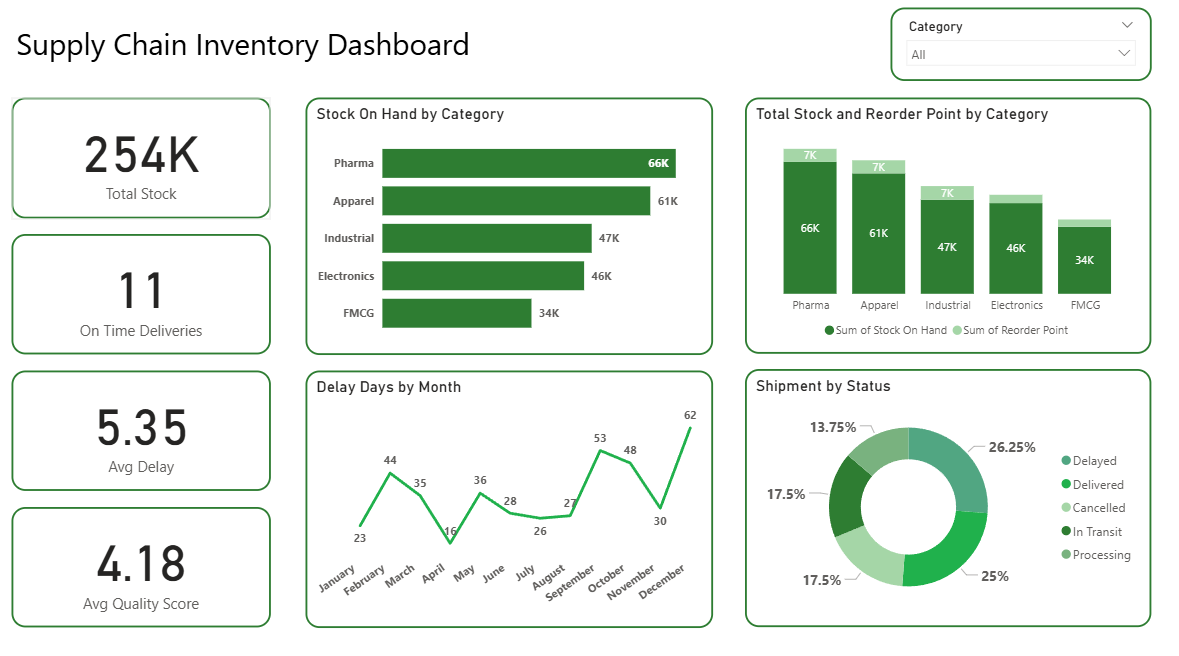
Summary The Briqlab Supply Chain Performance Dashboard is a professional-grade Power BI solution engineered for Supply Chain Managers, Procurement Heads, and Operations Directors who require total end-to-end visibility. This dashboard transforms fragmented logistics data into actionable supply chain intelligence, allowing you to monitor inventory health, supplier reliability, and shipment tracking in one unified, interactive interface. Key Supply Chain Metrics Inventory Optimization KPIs: Real-time tracking of stock-on-hand vs. reorder points and ABC classification analysis to eliminate stockouts and dead stock. Supplier Performance Scorecards: Data-driven insights into on-time delivery rates, quality scores, lead times, and price variance by vendor. Logistics & Shipment Tracking: Comprehensive visibility into carrier performance, shipment status, and delivery delay analysis across all transportation modes. Fulfillment Efficiency: Precision monitoring of the purchase-order-to-delivery cycle time and days of supply calculations. Operational Health Monitoring: Identification of slow-moving inventory and warehouse-specific KPIs to optimize replenishment and reduce carrying costs. Strategic Risk Mitigation: Visual tools to pinpoint supplier defects and logistical bottlenecks before they impact your bottom line. Make it Yours Download this Briqlab template to access the underlying DAX formulas and data architecture. Designed for seamless integration with SAP, Oracle, Dynamics 365, or Excel, you can simply plug in your own ERP data to start optimizing your supply chain operations today.
Interactive Demo Available
Explore this dashboard live in Power BI
Category
Templates
Chart Types
Bar, Line, Pie, Donut
Industry Types
Finance, Marketing, Information Technology
Main Colors
Green
Mode
light
Version
Pro
PBIX File
🔑 Sign in to DownloadBuy this Dashboard
