Published
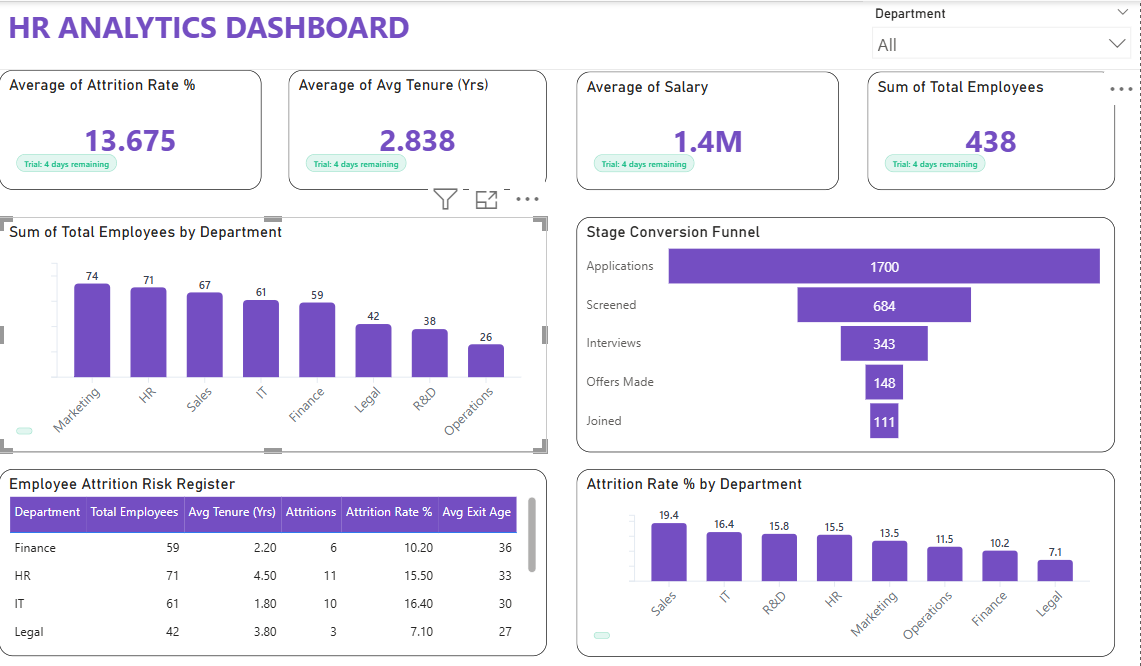
Summary The Briqlab HR Analytics Dashboard is a professional-grade Power BI solution engineered for HR Directors, People Managers, and CHROs who require a 360-degree view of their organization. This dashboard transforms fragmented HRIS data into actionable people intelligence, covering the entire employee lifecycle—from recruitment velocity to attrition risk—all in one unified, interactive interface. Key Human Capital Metrics Workforce Composition KPIs: Instant snapshots of total headcount, departmental distribution, and tenure mapping for a real-time organizational health check. Attrition & Retention Analytics: Data-driven monitoring of attrition rates and trends, segmented by department, tenure, and exit reasons to identify turnover drivers. Recruitment Funnel Efficiency: Precision tracking of the hiring pipeline, including Time-to-Hire, Cost-per-Hire, and candidate-to-employee conversion rates. Talent Risk Identification: Predictive flagging of attrition risk across high-value employee segments to enable proactive intervention and retention strategies. Performance & Appraisal Monitoring: Visual analysis of performance score distributions and appraisal completion rates to align workforce productivity with business goals. Strategic Workforce Planning: Integrated insights into departmental "people health," providing HR Business Partners with the data needed for board-level reporting and long-term planning. Make it Yours Download this Briqlab template to access the underlying DAX formulas and data architecture. Designed for seamless integration with SAP SuccessFactors, Workday, Darwinbox, Keka, or Excel, you can simply plug in your own HRIS data to start optimizing your human capital strategy today.
Interactive Demo Available
Explore this dashboard live in Power BI
Category
Templates
Chart Types
Bar, Tree Map / Hierarchical Chart
Industry Types
Information Technology
Main Colors
#744EC2
Mode
light
Version
Pro
PBIX File
🔑 Sign in to DownloadBuy this Dashboard
