Published
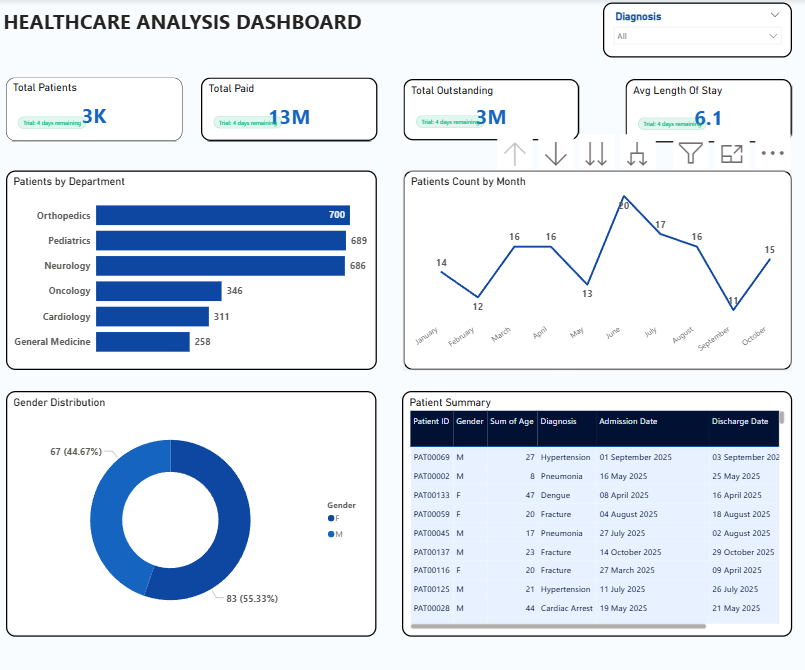
Summary The Briqlab Healthcare Performance Dashboard is a professional-grade Power BI solution engineered for Hospital Administrators, Medical Directors, and Healthcare CFOs who require total visibility into clinical and financial operations. This dashboard transforms complex patient data into actionable healthcare intelligence, enabling medical facilities to optimize patient flow, monitor department performance, and safeguard financial health in one unified interface. Key Healthcare Performance Metrics Patient Flow KPIs: Instant snapshots of total admissions, Average Length of Stay (ALOS), and discharge rates to optimize throughput. Capacity & Ward Management: Real-time tracking of bed occupancy rates by ward and department to prevent bottlenecks in care. Clinical & Demographic Insights: Granular breakdown of patient demographics and diagnosis distribution to align resources with community needs. Revenue & Billing Analytics: Data-driven visibility into department-wise profit margins, total billed revenue, and outstanding collections. Quality of Care Monitoring: Precision tracking of readmission rates and patient satisfaction scores to maintain high clinical standards. Operational Productivity: Comparative benchmarking of doctor performance and department-level efficiency to improve overall hospital productivity. Make it Yours Download this Briqlab template to access the underlying DAX formulas and data architecture. Designed for seamless integration with Practo, HealthSuite, Epic, or HIS exports, you can simply plug in your own anonymized dataset to start optimizing your healthcare operations today.
Interactive Demo Available
Explore this dashboard live in Power BI
Category
Templates
Chart Types
Bar, Line, Pie
Industry Types
Healthcare
Main Colors
Blue
Mode
light
Version
Pro
PBIX File
🔑 Sign in to DownloadBuy this Dashboard
