Published
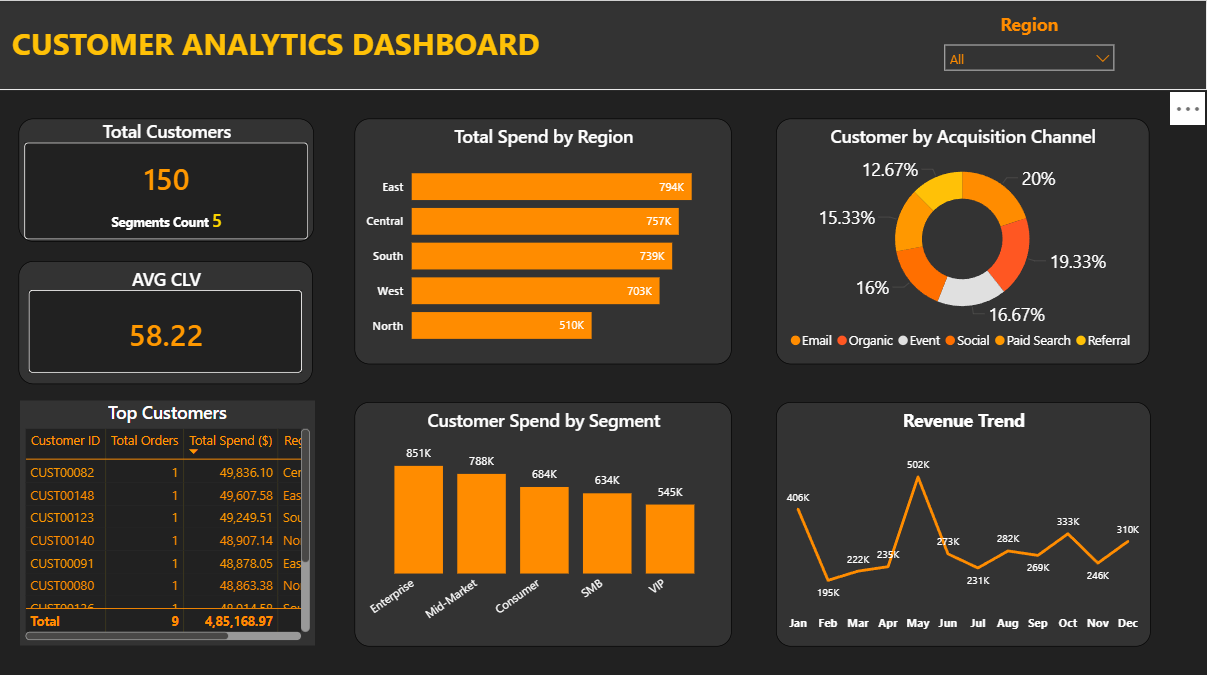
Understand and act on your customer data with this Customer Analytics Power BI dashboard template, built to give marketing teams and business leaders a complete view of customer behaviour, spending patterns, and acquisition performance. The dashboard tracks all essential customer metrics including total customer count, customer lifetime value, revenue trends over time, and top customer rankings by spend and engagement. Additional KPIs cover acquisition channel performance and customer segment breakdowns, helping teams identify which channels drive the highest value customers and where marketing budgets are best directed. This template is designed for marketing managers, CRM analysts, sales directors, and business owners who need to move beyond surface-level data and make informed, data-driven decisions about customer retention, segmentation, and growth strategy. Visuals include customer segment comparison charts, lifetime value trend lines, acquisition channel performance bar charts, revenue growth indicators, and top customer leaderboards — all built natively in Power BI Desktop with no additional plugins or external tools required. Whether used for monthly marketing reviews or quarterly business planning, this dashboard puts your customer intelligence front and centre. Download this Customer Analytics Power BI dashboard template, open the PBIX file in Power BI Desktop, and start turning customer data into smarter business decisions today.
Interactive Demo Available
Explore this dashboard live in Power BI
Category
Templates
Chart Types
Bar, Line, Donut
Industry Types
Finance, Retail, Marketing
Main Colors
Yellow, #FF6F00
Mode
dark
Version
Pro
PBIX File
🔑 Sign in to DownloadBuy this Dashboard
